Choosing the right WordPress page builder can have a major impact on how you design, manage, and grow your website. Two names that frequently come up in the conversation are Elementor and Bricks Builder.
But when comparing Elementor vs Bricks, which one is actually better?
The answer depends on what you need. Elementor is known for its beginner-friendly visual editor, large ecosystem, and extensive design tools. Bricks, meanwhile, appeals to developers and advanced WordPress users who want greater control, cleaner output, and a performance-focused workflow.
In this guide, we’ll compare Elementor vs Bricks based on ease of use, performance, design flexibility, SEO, dynamic content, WooCommerce, and overall value so you can choose the right WordPress builder for your website.
What Is Elementor?
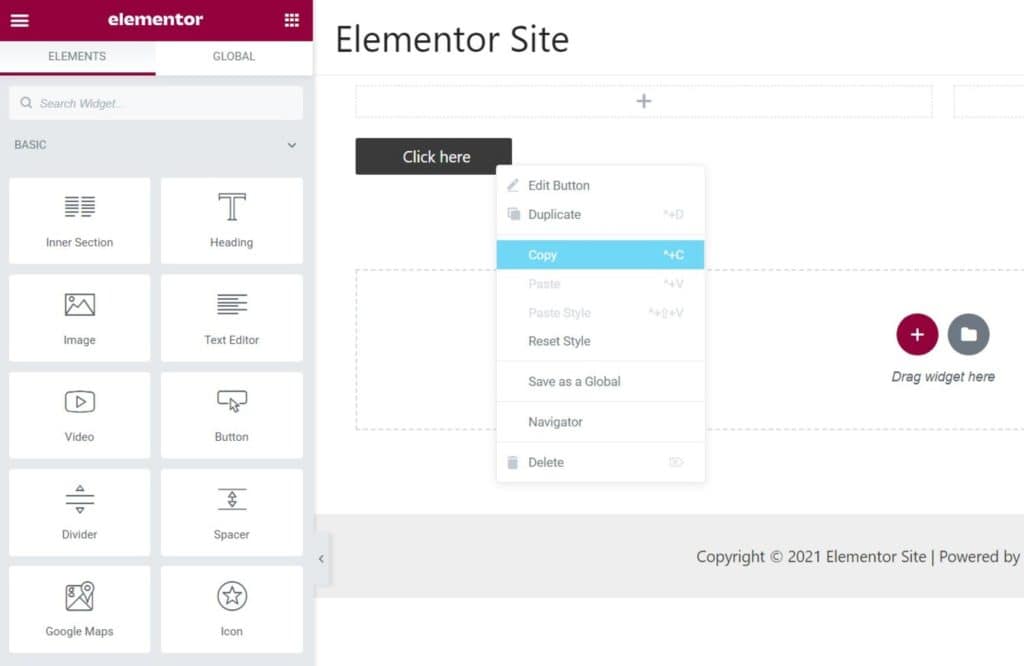
Elementor is a visual WordPress website builder that lets users create pages without writing code. Its drag-and-drop interface makes it possible to build everything from business websites and landing pages to blogs and online stores.
One of Elementor’s biggest advantages is accessibility. Beginners can start designing visually, while experienced users can take advantage of responsive controls, global styles, dynamic content, custom CSS, templates, and theme-building features.
Elementor’s Theme Builder can also be used to customize headers, footers, posts, archives, WooCommerce products, and other major parts of a WordPress website.
This makes Elementor a practical option for small businesses, freelancers, marketers, designers, and agencies that want to build websites quickly.
What Is Bricks Builder?
Bricks Builder is a visual site builder for WordPress designed with performance, flexibility, and advanced customization in mind.
Bricks combines visual editing with features that appeal to more technical WordPress users. Its tools include dynamic data, query loops, reusable components, responsive controls, global classes, custom code, and WooCommerce design capabilities.
Bricks can be especially attractive if you build custom websites for clients and want more control over the site’s structure and styling.
Elementor vs Bricks: Quick Comparison
| Feature | Elementor | Bricks |
| Ease of use | Excellent | Good |
| Beginner friendly | Excellent | Good |
| Design flexibility | Excellent | Excellent |
| Performance focus | Very good | Excellent |
| Theme building | Yes | Yes |
| Dynamic content | Yes | Yes |
| WooCommerce | Excellent | Excellent |
| Third-party ecosystem | Very large | Growing |
| Developer controls | Good | Excellent |
| Learning curve | Lower | Higher |
Both builders are capable of producing professional websites. The biggest difference is often how much control you want versus how quickly you want to build.
Elementor vs Bricks: Ease of Use
For beginners, Elementor generally has the advantage.
Its visual interface is designed around drag-and-drop editing. You can select a widget, place it on the page, and adjust its content and styling from the editor.
This makes it relatively easy for business owners and new WordPress users to start building pages without understanding CSS or advanced WordPress concepts.
Bricks is also visual, but its interface exposes more advanced controls. That can be a major advantage for experienced users, but it may take longer to learn.
Winner: Elementor
If your priority is getting comfortable with WordPress website design quickly, Elementor is the easier starting point.
Elementor vs Bricks: Performance
Performance is one of the biggest reasons people search for Bricks vs Elementor.
Bricks places a strong emphasis on performance and asset loading. Its documentation explains that many frontend assets are loaded only when needed, while additional optimization options can help reduce the amount of CSS and JavaScript delivered to visitors.
However, it would be inaccurate to say that Elementor automatically creates slow websites.
Elementor has introduced several performance improvements, including optimized image loading, element caching, optimized control loading, and improvements designed to reduce DOM size.
That means the real question isn’t simply “Is Elementor slow?”
A better question is:
How is the website built and optimized?
Your hosting provider, images, plugins, fonts, caching configuration, scripts, theme, and page structure can all affect performance.
Google also recommends considering page experience holistically. Core Web Vitals matter, but strong scores alone do not guarantee higher rankings.
Winner: Bricks for performance-focused development
Bricks has an advantage for users who want granular control over asset loading and website structure. Elementor can still perform very well when properly configured and optimized.
Elementor vs Bricks: Design Flexibility
Both builders provide extensive design controls.
You can create:
- Custom layouts
- Responsive designs
- Global styles
- Typography systems
- Buttons and forms
- Landing pages
- Headers and footers
- Animations
- Dynamic templates
- WooCommerce layouts
Elementor’s strength is its visual workflow and extensive collection of widgets and design options.
Bricks takes a more system-oriented approach. Its global classes, variables, components, responsive controls, and styling options can make it attractive for developers building larger custom websites.
Winner: Tie
Choose Elementor if you prioritize ease and speed of visual design. Choose Bricks if you want deeper control over how your design system is structured.
Bricks vs Elementor for Dynamic Websites
Dynamic content becomes increasingly important as a WordPress website grows.
For example, you might need to create templates for:
- Blog posts
- Team members
- Properties
- Services
- Events
- Products
- Directories
- Custom post types
Bricks provides tools for dynamic data, query loops, query filters, conditions, and reusable components.
Elementor also supports dynamic content and theme-building workflows, making it possible to create templates that automatically display WordPress content.
Winner: Bricks for advanced dynamic builds
For straightforward websites, either builder can work well. For complex, data-driven websites, Bricks may provide a more developer-friendly workflow.
Elementor vs Bricks for WooCommerce
Both Elementor and Bricks can be used to customize WooCommerce websites.
You can create customized:
- Product pages
- Product archives
- Shop layouts
- Product grids
- Cart pages
- Checkout experiences
- Account pages
The right choice depends largely on your design requirements and technical experience.
Elementor is appealing if you want a familiar visual workflow and a broad ecosystem. Bricks is attractive when you need highly customized WooCommerce templates and greater control over the site’s structure.
Winner: Tie
For a small business ecommerce website, Elementor may be easier to manage. For a highly customized WooCommerce project, Bricks deserves serious consideration.
Elementor vs Bricks for SEO
Does the page builder affect SEO?
Yes, but probably not in the way you think.
Neither Elementor nor Bricks will automatically make your website rank higher on Google.
SEO depends on many factors, including:
- Helpful and relevant content
- Search intent
- Technical SEO
- Site structure
- Internal linking
- Mobile usability
- Page performance
- Crawlability
- Structured data
- Backlinks
- Website authority
Both builders can be used to create SEO-friendly websites.
The important thing is to avoid creating unnecessarily complicated layouts, oversized images, excessive plugins, or poorly structured content.
For more SEO and website optimization advice, explore the resources available through DIP Outsource Web Design Services.
Winner: Tie
Your implementation matters more than the page builder itself.
Elementor vs Bricks: Which Is Better for Beginners?
If you’re completely new to WordPress, Elementor is likely the better option.
Its visual workflow is easier to understand, and there is a large amount of educational content available online.
Bricks can also be learned by beginners, but its advanced features become more useful as your WordPress and CSS knowledge grows. Bricks itself provides a structured getting-started learning path covering templates, responsive design, dynamic data, and query loops.
Choose Elementor if: You want simplicity and an easier learning curve.
Choose Bricks if: You’re willing to learn more in exchange for greater control.
Elementor vs Bricks: Which One Should You Choose?
Here’s a simple way to decide.
Choose Elementor if you:
- Are new to WordPress
- Want an intuitive drag-and-drop editor
- Need to build websites quickly
- Want access to a large ecosystem
- Prefer extensive templates and widgets
- Build standard business websites
- Want an easier workflow for clients
Choose Bricks if you:
- Have experience with WordPress
- Understand CSS and responsive layouts
- Prioritize performance
- Build highly customized websites
- Need advanced dynamic content
- Want greater control over your site’s structure
- Build websites for clients or agencies
So, Which Is Better: Elementor or Bricks?
There isn’t a universal winner in the Elementor vs Bricks debate.
Elementor is the better choice for accessibility, ease of use, and a large ecosystem.
Bricks is the better choice for performance-focused, highly customized, and developer-oriented websites.
If you’re building a straightforward business website and want to move quickly, Elementor is an excellent choice.
If you’re creating a complex WordPress website and want more control over the code, structure, dynamic content, and performance, Bricks may be the better fit.
The most important thing is to choose a builder based on your website’s goals—not simply which builder is currently trending.
And remember: a great page builder cannot replace good website strategy. Your hosting, content, SEO, design, accessibility, performance optimization, and ongoing maintenance all contribute to the final result.
If you need help deciding between Elementor and Bricks—or want a professionally built WordPress website—DIP Outsource Web Design Services can help you choose a setup that fits your business and long-term goals.
Frequently Asked Questions
Is Bricks better than Elementor?
Bricks can be better for developers and performance-focused websites, while Elementor is generally better for beginners and users who value ease of use. The right option depends on your project.
Is Bricks faster than Elementor?
Bricks is designed with performance and asset loading efficiency in mind. However, Elementor has also introduced significant performance improvements. Actual website speed depends on implementation, hosting, plugins, images, caching, and other factors.
Is Elementor easier than Bricks?
Generally, yes. Elementor has a beginner-friendly visual editing workflow, while Bricks exposes more advanced controls that can require a longer learning curve.
Can I switch from Elementor to Bricks?
Yes, but switching page builders can require rebuilding or restructuring pages and templates. It is not usually as simple as changing one WordPress setting.
Which is better for SEO, Elementor or Bricks?
Both can support SEO-friendly websites. Neither builder guarantees rankings. Website structure, content quality, technical SEO, performance, and other ranking factors are more important.
Which is better for developers?
Bricks is often more attractive to developers because of its emphasis on classes, dynamic data, components, custom code, and granular control.
Which WordPress page builder should I use?
Choose Elementor if ease of use and a broad ecosystem are your priorities. Choose Bricks if performance, flexibility, and advanced customization are more important.